API Keys and Webhooks
Create and rotate API keys, configure webhooks, and diagnose failed deliveries.
#API Keys and Webhooks
API keys are the credentials your software uses to talk to mAIvn, and webhooks are how mAIvn talks back to your software when something happens. This guide covers both: creating and safeguarding keys, and setting up webhook endpoints to receive event callbacks — all from the portal.
See also: Authentication & API Keys — how to use a key from the SDK (api_key/Client), key scopes, and handling rejected keys in Python.
#API Keys
Use API keys when your application needs server-to-server access. Each key is restricted to its project. Fine-grained key permission levels are not available.
#Key lifecycle
- Create key with a descriptive name.
- Copy plaintext key immediately (shown once).
- Store in secure secret manager.
- Rotate or revoke as needed.
Revocation takes effect everywhere within 30 seconds.
#Visibility model
Key visibility follows your account's organization and project permissions.
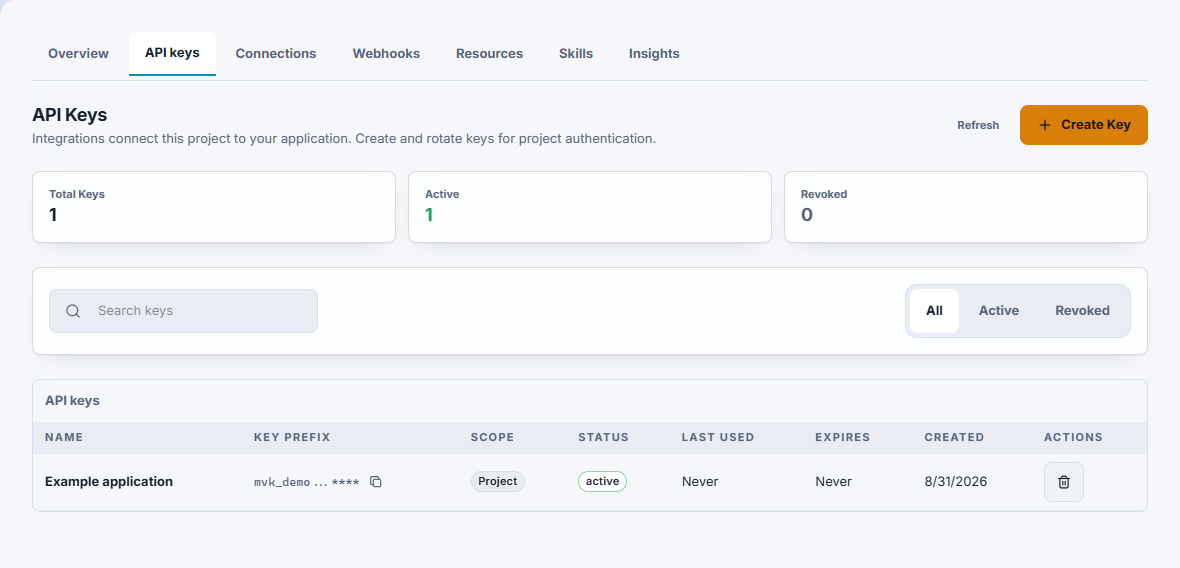
Current Portal interface with sample data. The masked prefix shown here is not a usable credential.
#Webhooks
Webhooks let your systems receive event callbacks from the platform.
Each webhook includes:
- Endpoint URL
- Event list
- Active/inactive state
- Failure counters
#Reliability checklist
- Return a
2xxstatus quickly. - Verify webhook signatures before processing.
- Retry idempotently on duplicates/timeouts.
- Track consecutive failures and disable noisy endpoints.
#Security Checklist
- Never embed API keys in frontend code.
- Use separate project keys for workloads that need separate access or revocation.
- Rotate keys on schedule and incident response.
- Use HTTPS-only webhook endpoints.
#Next steps
- Authentication & API Keys — use a key from the SDK (
api_key/Client), understand key scopes, and handle rejected keys in Python. - Team and Project Operations — organize keys and webhooks across teams and projects.